Keeping your personal information up to date is important on the Manav Sampada portal. Whether you’ve changed your contact details, address, or any other personal information, you need to ensure that your data is correct to avoid any issues with your leave requests, salary slips, or communication from HR.

This guide will walk you through the steps to update your personal info on the Manav Sampada Portal.
How to Update Personal Info on Manav Sampada Portal

Why Update Your Personal Info?

There are several reasons why you might need to update your details on Manav Sampada:

  • Change in address or contact details: If you’ve moved to a new address or changed your phone number, updating your contact info ensures you receive important communications.
  • Correcting mistakes: Sometimes errors are made while entering personal details, and you may need to fix them.
  • Marriage or family changes: Updates like marital status or dependent details may require an update to ensure your leave and benefits are processed correctly.

Step-by-Step Guide to Update Your Personal Info

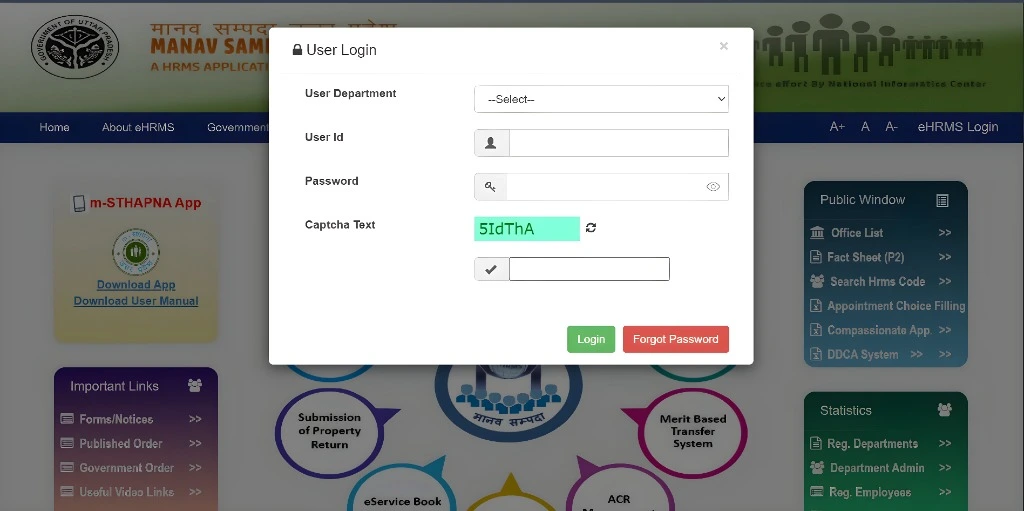
1. Log in to Manav Sampada

The first step is to log in to the Manav Sampada Portal using your User ID and password. After logging in, you’ll be taken to your personal dashboard where you can manage your details.

Go to the Personal Information Section

Once logged in:

  • Navigate to the Personal Information or Profile Update section on your dashboard. The exact name of this section might vary slightly depending on the portal version.

In this section, you’ll be able to view and edit the information that’s linked to your account, such as:

  • Contact details (phone number, email)
  • Address
  • Bank account details (if needed)
  • Emergency contacts (in case HR needs to reach someone for you)

Edit the Information You Need to Update

In the Personal Information section, you’ll be able to edit the fields that need updating. Here’s how to do it:

  • Contact Information: If you’ve changed your phone number or email, click on the edit button next to the relevant field and enter your new details.
  • Address: To update your address, you’ll see an option to edit the address field. Enter your new address information and save.
  • Emergency Contacts: If someone in your family or circle has changed or you want to add a new emergency contact, simply click the appropriate edit button and fill in the details.You can also read: How to Change Your Manav Sampada Portal Password Safely

Save Your Changes

How to Update Personal Info on Manav Sampada Portal

After updating the necessary information, make sure to save your changes. Most portals will have a “Save” or “Submit” button at the bottom of the page. Click it to ensure that your new details are saved correctly.

Verify the Changes

Once you’ve saved your changes, it’s a good idea to double-check that everything is correct. Go back to the Personal Information section and review the updated details to ensure they’re accurate.

Contact HR for Any Issues

If you’re unable to update certain details, or if the system doesn’t allow you to make the changes (like a name correction), it’s best to contact your HR department. They can assist you in making any necessary corrections or provide instructions on how to proceed.

Helpful Tips

  • Keep your email and phone number updated: This ensures that you receive timely notifications about leave approvals, salary updates, and any HR-related communication.
  • Check for errors: Before saving, double-check that everything is entered correctly, as mistakes can cause issues later, especially with official documents.
  • Regularly update your info: Whenever you have a change in your personal information (like moving to a new place), remember to update it on the portal promptly.

Frequently Asked Questions

After saving the changes, go back to the Personal Information section and check if the updated details are reflected. If there are any issues, contact HR.

For sensitive details like your name, you may need to contact HR directly, as these changes often require additional verification or approval.

Incorrect contact information can lead to missed communications from HR, so it’s important to update it as soon as possible. If you can’t update it online, reach out to HR.

It’s a good practice to review and update your details whenever you have any changes in your personal life, like moving homes, changing phone numbers, or getting married.

If you’re unable to access or edit the Personal Information section, contact the Manav Sampada support team or your HR department for assistance.

Final Thought:

Keeping your personal information updated on Manav Sampada is important to ensure smooth communication and processing of your requests. Whether it’s updating your address, phone number, or emergency contacts, the process is easy and quick. Just follow the steps above, and if you need help, don’t hesitate to reach out to your HR department.
By regularly reviewing your information, you’ll ensure that everything stays accurate and up-to-date!

Similar Posts

Leave a Reply

Your email address will not be published. Required fields are marked *